Leave a comment

Powermail Day 10, Powermail is losing favor :-(

Powermail, after all that work of setting it up properly, may not remain my replacement for Entourage. Powermail has had a long history and has been a bit of curmudgeon when adding new features. It took forever to be able to see HTML emails natively. Now I know a lot of people don’t like graphic emails, but I don’t mind them, and in fact, when viewing ads from my suppliers for software or books, I want to see the images.  You used to have to click to open the mail in an alternate browser.  Now you can see things natively, but the URL clicks don’t always work, and it is hard to tell when or why they don’t.

Problems communicating with Mail Servers

I rejoined the PM mail list group to get feedback from other users on my setup and possible glitches I was encountering. Unfortunately, the problems I was seeing were not specific to me. And I have discovered what is potentially a fatal flaw in the program.   Powermail was not reliably deleting emails on the server when I deleted them from my local computer, and apparently, it was deleting some emails from the server when I moved them into a folder on my desktop.

My preference settings are “leave copies of retrieved messages on server” to allow my mobile platform not to delete copies for my home computer, but set to “delete from server when deleting locally” so junk mail and irrelevant stuff is removed. The loss of some moved mail and the failure to delete emails was an irregular occurrence, and I could not predict when or why it was happening.   I have access to logs but I’d have to know which ones to look at and what to look for in them, and then to know exactly when it occurred, which is hard to figure out because I don’t know anything is amiss until I fire up an alternate email program and see a discrepancy.  That is more effort than I need to find a functioning email program.

A fellow user on the PM group had this to say about his/her experience:

The only conclusion I could reach from my investigations was that from time
to time PowerMail does not agree with the mail server what messages have
been downloaded or not , which in my case led to a few messages being
apparently lost and tens of thousands of messages getting redownloaded even
though I already had them.

As a contrast Apple’s Mail performs without any problems with the same
accounts (but if this is because it’s better at handling the communication
with Mail servers I can’t know for sure as I had been using PowerMail
previously on the same accounts and to most extent the same messages).

I may be asking for the impossible. Something that has all the features of Entourage, the generally well functioning service, despite the all too frequent crashes in Entourage (about 5 times a day when clicking on html messages), and at a cost significantly less than the new Office 2011 Business version to come.

The advantages of Powermail are the vastly superior search capabilities over the search function in Entourage  (Entourage is a slow poke when doing searches of large databases -maddeningly slow), and its stability. I think I’ve only had one or two crashes in 10 days of use. But if Powermail loses even a few mails, that is not acceptable to me or to my business.

Powermail’s development team is small and, while slow, has been consistent, but it’s programming core, around since non-intel, and possibly since OS9, is starting to show its age.

I thought about digging up good old Eudora again, but that program ceased development a couple of years ago, and I can’t afford to get into another EOL situation. I am still at a loss of what to do…

More to come…

Leave a comment

Powermail 6 day 5 – moving from MS Entourage

I’m now on day 5 of my switch to Powermail from Entourage. I did not find my gold mine or oasis yet. Fortunately, I have had Powermail for a LONG time and I had some filters set up, which I had to modify to match the new folders layout.  But I have run into a few problems and inconveniences:

  1. In Entourage, I can send messages to Groups and then Expand the Group and remove people from the outgoing mail individually. I have about 20 people with whom I share jokes, but I don’t send them back to the ones who have already received them or the one who sent it to me. I sent using BCC. But there is no way to edit and outgoing group in PM without editing the group’s members in Address Book.
  2. Some of my filters are not catching members of groups and I’m not sure why. I sort incoming mail by group membership. Either that, or it is not catching incoming mail by labels.
  3. If Address Book is used as the default AB in Powermail, you cannot label an address.
  4. Clicking URL links in emails does not always work. It is a known issue, but when and why it works and why it doesn’t is a mystery.
  5. You cannot save common search features like saving a display of unread mail. There is a recent mail, but that does not display unread mail.
  6. You cannot create an HTML email.
  7. Although I have Powermail set to delete emails from the server that I have deleted from PM, it fails to delete them on next connection.
  8. Sometimes it retrieves emails and then removes them from the server instead of leaving them on the server as instructed. This is important for me when I travel and need to have copies left on the server to be downloaded when I get home.

I’m still struggling to like this setup, but I’d say so far, it is just an okay solution. I miss some of the functionality of Entourage.

Leave a comment

Moving Email databases the Long Way – migrating to Powermail from Entourage

It took all day

Okay, the long and the short of it is that every export option I tried to Powermail failed at some point or another. Exporting from Mail to Mailbox archives produced unreadable files in Powermail. Importing directly from Mail databases caused Powermail to stall on the first folder with subfolders of my clients and about 2300 messages. Nothing after my first folder would import after several tries.

I also found that the script I mentioned earlier failed to completely export subfolders from Entourage so that I was left not only with missing subfolders, but it failed to export  a significant number of my 100 folders even at the top level.

Finally I just did it long hand. I dragged all my folders out of Entourage one by one, creating mbox files. (Note, you cannot drag parent folders and then expect the child folders to be included. You must drag the parent folders out separately and then also drag each child folder separately to create non-hierarchical mbox files.) I then renamed the files to remove the mbox visible name (that did not change the extension of the files). I then dragged the files into the Powermail folder window and had to approve each folder manually. I then organized these folders by dragging them into subfolders and thereby recreated my Entourage hierarchy of folders with some changes and updates to my existing system.

Checking my Postbox import that properly included all the folders from Apple Mail, I found that many of the messages were missing. So there seems to be some limitation either with Apple Mail or with the who import export system with a large number of emails that causes a problem for ANY program.

So it is now 10:40 pm and I have yet to start on any filters or rules to sort my incoming mail. I have not transferred my signatures. I have not set up any of my client or wife’s IMAP accounts, and I have yet to hear back from Powermail about the outgoing SMTP problem.

What a crazy way to live.

Leave a comment

Entourage Replacements

Since I’m trying to replace Microsoft Entourage, I’ve started testing 3 email programs: Powermail 6, Apple Mail, and Postbox 1.

Oddities and Problems:

SMTP Mail:

For some reason, Apple Mail, Postbox, and Powermail require that you turn off SMTP secure authorization when sending mail through my primary business host (pair.com).  Unlike Entourage, which seems to work flawlessly, it has been hit and miss with the other programs until I figured out this unusual setup. I suspect that Pair recognizes me as already signed in, because it requires me to retrieve email before I can send out. However, I’ve discovered a bug in Powermail that does not allow me to do a relay at all. Pair requires I use relay.pair.com instead of smtp.petersonsales.net. While my incoming server is mail.petersonsales.net, my outgoing must be relay at pair.  The problem is that Powermail tries to send out using my domain name and I cannot get it to use the proper relay.

Importing from Entourage – transferring the email database.

I tried native import from Postbox. There is no option to import from Entourage into Postbox, but there is an option to import from Mail.  Mail has the option to import from Entourage natively, but 2 attempts to import from Entourage caused a large loss of emails after a certain number were imported, so it was ineffective (my database is about 1.5gigs). Powermail can import from Entourage, but the process is laborious. You must export all mail into an mbox format in order to import it into Powermail. You can do this by dragging every mail folder from your Entourage mailbox to your desktop and then dragging it into Powermail, or you can choose to import the mbox files one by one using the import function, but in either case, you lose your hierarchical, mail folder structure.

In order to overcome the problems in Mail import, I found a nice little script by Barry Wainwright that will export all Entourage folders as mbox files. It will also export emails as Eudora folders, which may allow more versatile importing. This saves time when importing to Powermail, but while all the folders are imported, you again lose the hierarchical folder structure. They also are imported by Powermail with an .MBOX extension name. I used a global renamer utility called A Better Finder Renamer prior to import to remove the visible extension.

This export script also works for importing into Mail with the same loss of hierarchy. I did find that Mail will import from Entourage mostly correctly if you export from Entourage as a .RGE file and then use Mail to import from mbox files and choose the exported username.rge file. After you have imported the rge into Mail, then you can import into Postbox and Powermail and preserve the hierarchy.

Mail has a reasonable number of options for importing from different mail programs like Thunderbird, Eudora, and Netscape, as well as from mboxes and from itself.  But its direct Entourage import leaves something to be desired. Exporting from Entourage is safer.  The major problem with the import into Mail from rge is that your folders are duplicated. So, for example, if you have a folder in Entourage named “clients ” with subfolders named “Bob’s Auto,” “Jim’s Windows,” etc., Mail will import the mailboxes, but will also create subfolders for each of the folders with the same name.    Bob’s and Jim’s folders are inside folders name Bob’s and Jim’s.  Soon the multiplication of folders becomes a headache, with extra layers of  hierarchy you don’t need.

Powermail has the most options for importing from other mail programs. I ended up importing my mail from Mail and was able to preserve the folder hierarchy. However, it too created the duplication of folders from the Mail import. Because it has imported from Mail, as does Postbox, all the programs are infected by this duplication problem.
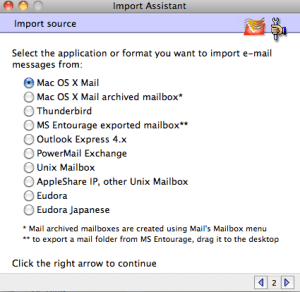
Powermail 6's Import options

Powermail Import Options

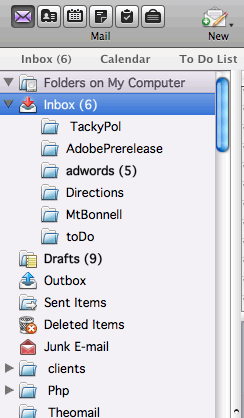
As with Mail, Powermail’s folders are not integrated into the top level along with the Inbox as they are in Entourage:

Entourage Mailbox folders

Entourage Mailbox folders

Powermail puts the folders in a subfolder called Mailboxes, which just makes sorting a little bit harder. However, Powermail’s Recent Mail window makes the problem less disconcerting.

Postbox was able finally to import my mailbox folders in hierarchy after the successful import into Mail, but it has the least available options for importing, allowing imports only from Mail, Communicator, and Eudora. But after testing Powerbox and importing to my mail, Postbox crashed with an apparently unrecoverable error, and it would not restart, displaying a message about a missing application data file. Too bad, I was considering it for a replacement because it offers a lot of features and threading of messages. But I cannot afford an unreliable program for my business email. I finally got Postbox to work again by holding down the command key and restarting. So far things are working… but, I’m not sure I trust the program.

Filters – the major obstacle!

I have many filters for my mail, sorting it for me automatically into client folders, accepted advertisers, personal mail, etc. I probably have about 50 filters. Unfortunately, none of the existing programs allow you to transfer Entourage mail rule (filters) to a new environment.  That is because all programs create rules differently.  The most ungainly of the three programs is Apple Mail, because to create a mail rule, you must open the preferences and then create the mail rule. That will be inconvenient to say the least for my transfer.

Powermail seems to be the easiest program for creating filters, which you can do right from the Settings menu. The process is relatively straight forward.  Creating  filters in Postbox reveals what seems to me to be the oddity of the way it handles mail.  While it is easy to create filters in Postbox, the program keeps your mail on the server unless you actually create a filter and send the mail from the server to a local folder on your computer.   This process may mimic Thunderbird and other online readers, but I like having the mail on my computer for a couple of reasons. One, my hosting has mailbox limits and I delete my mail on the server after 30 days using Entourage. Two, if I want to see my files online, I use IMAP settings, and have both for my mail in Entourage.  Powermail downloads to local folders automatically as did Entourage. Mail also downloads to the Home folder.

Conclusion:

So far I have not fully tested Postbox, but I am leaning towards making Powermail my program of choice, if I can get it to work in SMTP. Powermail is actually the closest to the old and beloved Claris Email in OS 9.  Mail, though it works well, is not user friendly when it comes to creating filters. Postbox uses an online system that makes setting up filters more complicated but does allow you to use newsgroups. But darn it, Entourage just works  and has a good way of viewing and sending newsgroup postings. So far, none of the programs lives up to the ease of use of Entourage.

Since Powermail uses Apple’s AddressBook directly, the problem with syncing and duplication of addresses will be gone. Whether AddressBook offers a way of creating mailing labels or merged mail is a question for another day….  But using those features is no picnic in Entourage and Word in any case.

None of these replacement options are easy or free of labor. I will have to move and delete plenty of duplicated folders in whichever program I use. And all my signatures, rules, and filters will have to be replaced. For the rare time I use Newsgroups, I have increasing switched to NetNewsWire for those forums which allow RSS. The old format of newsreaders without RSS seems to be dying off. But posting to newsgroups requires a login instead of a simple post from Entourage.

I’ll keep you updated as I keep testing.

Leave a comment

Entourage is Dead! Microsoft Loses it’s way with Mac Customers…

“First of all, there’s a big change in functionality in the Home and Student version of Office 2011: it no longer includes an e-mail client. Office 2008 included Entourage, while Office 2011 includes Outlook—but only if you buy the $199 Home and Business version of Office…
The $119 Home and Student version allows one installation, as does the $199 Home and Office version. For multi-Mac households, you can buy a $149 three-install version of Home and Student, or a $279 two-install version of Home and Office.”

I guess I will not be upgrading. To have to pay $279 to be able to use Office on my laptop when away from home, which I would need for its email features, is just a deal killer. My biggest headache right now is the lack of integration of Entourage with Apple AddressBook. The syncing is terrible. Rather than syncing, Entourage creates duplicate records in AddressBook and in itself because all the fields don’t match exactly. I then spend hours cleaning up the duplications. I was hoping the new Outlook would fix that. Now it isn’t worth it. I’d basically be paying $279 to upgrade my mail program. It just isn’t worth it. Word does everything I need to right now and so does Excel almost. I may keep Office 2004 around just for Excel Macros. This is really, really STUPID marketing.

I will be switching to OpenOffice and I’ll find another way of doing mail. Apple Mail doesn’t seem to have enough features for me, and I have trouble making connections with it on non-Apple servers. I’ve had Powermail for years as a backup when Entourage crashed. It integrates completely with AddressBook without duplications. It has had a discrete message format for years, rather than collect all email in a huge, single database, as Entourage does. The one thing I’ll miss is the calendar integration, and perhaps the newsgroup reader.

Anyone have any other recommendations for mail on the Mac?