1 Comment

The Ruger Mini 14 and Gunsite Scout Rifles

The Ruger Mini 14 and Scout Rifles

Just got back from the NRA 2011 Convention in Pittsburgh and had a great time. Just wanted to report that for me, the hit of the show were 2 rifles from Ruger, the Mini 14 Ranch Rifle and the new Gunsite Scout bolt action. The Mini 14 comes in Nato 5.56mm / .223 Rem, and in 6.8 SPC. While the Scout comes in .308 Winchester with a 5 and 10 Mag clip. What I liked about the Mini 14 was the open sites. Quick, easy acquisition, easy targeting. It also had a great feel and balance. I asked the reps what they thought the main difference was between the two rifles and they felt that the Gunsite would just be better at longer range and accuracy. The Gunsite is a bolt action with a Picatinny Rail system, flash suppressor and recoil pad. It also felt good in the hand. I’m not sure what, if any, advantage the Mini 14 would have over an AR style weapon, but it just feels better in the hands and easier to snap shoot.

The Gunsite Scout begs for a 1 -3 power scope and looks naked without one. The bolt requires deliberation. The Mini reminds me of the WWII Carbine in size and has a Garand Style action, except it is lighter with it’s hardwood or polymer stocks, weighing in between 6.75 to 7 lbs.

If I were starting fresh and in the market for a general purpose rifle for hunting and possible self defense, I’d take a look at the Gunsite Scout for both purposes. If I were thinking about close quarter combat, the Mini 14 would be easy to swing about, aim and fire.

4 Comments

S&W Bodyguard vs. Ruger LCR with Lasers: Initial Impressions


S&W Bodyguard 38I went to the NRA Convention this morning in Pittsburgh, PA and I’m glad I did. I got to meet a lot of fine people and talk to a whole host of dealers of various products. But the main reason I went to the show was to compare concealed carry revolvers for my wife. My wife has trouble with operating the slide on a 1911 style 9mm in any of the various forms. And if we were in a dangerous situation, I don’t want either one of us to be having to remember what to do to make a gun work. It has to be natural and second nature. The only slide operated pistol she has felt comfortable with is a Bersa style 380. The slide is easy and requires a light touch. And we may wind up getting her one of those, after we take to the range to test fire a friend’s LCR.

I spoke with both the Smith & Wesson folks and the Ruger folks and both were very helpful. The Bodyguard 38 revolver uses a new design of a gear, claw type advance on the cylinder and has a polymer frame I believe. What was nice about the Bodyguard was the ease of the trigger pull. I would have to say that the gun was a bit smoother than the Ruger and lighter on the trigger. If neither gun had a laser trace, I would probably pick the S&W for my wife. It just felt a little better in my hand.

ruger LCR

The Ruger booth had plenty of LCR’s to handle and the trigger pull was just slightly harder than the Bodyguard and if I had not just tested the other one, I probably would not have been able to tell the difference.  Both the Bodyguard and the LCR come with optional embedded lasers. S&W has one of its own design and the LCR comes with the Crimson Trace. I had to go down to the Crimson Trace booth to try an LCR with an embedded laser because they did not have one at Ruger’s.

The LCR’s laser uses the patented Crimson Trace grip activation. There is a button that rests under the index finger and when you squeeze the gun, the laser lights up. My hand was a little big for the gun, and so it took a few trials to get the laser to light up consistently. I found I was putting more pressure between my thumb and trigger finger than on the grip with my index finger. However with practice and my wife’s slightly smaller hand, I think this would become a natural fit for her.

That brings me to my discomfort with the S&W custom laser. In order to turn on the the S&W laser, you have to press a button on the top of the revolver to the right of where the hammer would normally be. (Both of these models have internal firing pins and no external hammers.). Turning on the laser trace was awkward and required me to use my other hand while holding the revolver with my right hand. All I can say is that this unnatural motion would be the wrong thing to have to remember how to do in an unexpected crisis situation. You don’t want to have to think when you are fighting for your life. And if it were dark, you may have trouble finding the button to turn on the laser. That is better for home defense when you hear the breaking glass downstairs, but not when you are assaulted on the streets. Then you need immediate reactions and no thought about the mechanics of the gun.

Verdict: if the choice is between the two revolvers and you want or need a laser trace, I would pick the LCR with the Crimson Trace, no questions asked. We’ll see how my wife likes it when we get out to the range. I kind of liked the Bersa style 380 for a small concealed carry, but the problem with any slide operating pistol is that you have to either keep it cocked and loaded, or you have to have time to operate the slide. A revolver seems safer and a hammerless revolver seems unlikely to catch on something or fire while pulling it out of a purse or holster, but a 38 +P has enough firepower to make an adversary think twice; especially when he is not expecting a lady to be packing!

Leave a comment

Amazon’s Prime Membership Free Movie Streaming

A Review of Amazon’s Prime Membership Free Movie Streaming  – Not Ready for Prime Time

First take on Amazon’s attempt to compete with Netflix comes up short, especially on its search features. We are already Prime Members, and we have a Roku, so it was no hassle linking our Roku to our Amazon account. However, we are greatly disappointed for two reasons:  movie selection and search features.

First of all, the available movies for free streaming download are not nearly as extensive as Netflix’s offerings. Amazon has all the first runs, but they are not free. Which brings us to the second problem. The search feature in Amazon cannot be set to only search the free  Prime Membership offerings, so what happens is you find the movie or show you want to watch, but when you click on it, you find out it is only available if you pay for it. This makes Amazon’s “free” offerings more frustrating than satisfying.

Now, the search feature at Amazon.com has finally improved so that you can select Amazon Instant Video › Movies › Prime Eligible, but trying to search on Roku is an entirely different matter. It does not as yet have this ability to exclude Prime ineligible. Perhaps it will improve with time, but I would not pay for a Prime Membership for the movie offerings at this time.

1 Comment

Tom Corbett’s New Budget Cuts and Teacher Layoffs, PA

I went to a teacher retirement seminar today with my wife, and a speaker for the PSEA (Pennsylvania State Education Association) retired members began to criticize the massive budget cuts proposed by Governor Tom Corbett which will lead to large scale teacher layoffs. The liberal bias against Tom Corbett was predictable and he was speaking to mostly a Democrat crowed, but I don’t think he was expecting me to publicly interrupt him, taking umbrage at his assumptions and his attempt to use a retirement information seminar to promote a political agenda. However, I spoke with a former legislator at the seminar, Steven Nickol, who confirmed my assessment: since 1998, the state and the school districts have failed to contribute an adequate amount to fund their pension liabilities of the retirees in the state, both teachers and other public employees. In fact, former Governor Rendell took a budget surplus and blew it on pet projects, stadiums, and mismanaged transportation systems in Pittsburgh and Philadelphia instead of using that surplus to shore up the state employee retirement benefit system. So, for the last two democratic administrations, Rendell and Casey, persistent financial mismanagement of state and municipal retirement pension systems has led to a massive budget shortfall. These democratic administrations did not require the school districts to stay current with their retirement contributions either, leaving the state system with a large unfunded liability. This shortfall has forced school districts and the state into such a deficit that severe cost cutting is required. In fact, because the school districts have to make up their shortfalls and because the state cannot bail everyone out, many teachers are going to be laid off. But it is not only unjust but disingenuous to blame Corbett for this situation. He inherited the consequences of years of financial mismanagement. You might even say that the layoffs, and the budget crisis that is affecting the school districts, are the direct result of democratic administrations’ fiscal irresponsibility for the past twelve years.

So now someone has to be the adult in the room and tell all the children that they cannot have everything they want. It is very painful. It is going to hurt teaching. It is going to be a real problem. But when you have been living on credit card debt for years and the repo man comes to take your stuff away, you are forced to cut back whether you want to or not.

Now I agree with the PSEA head. You cannot ask the teachers to take a pay freeze, when the legislators are voting raises for themselves. That will not fly. But I don’t think blaming Corbett for being forced to put the fiscal house in order is either fair or just.  As Margret Thatcher said, “The problem with Socialism (liberalism) is that you eventually run out of other people’s money.” The state has to make up the difference and put the retirement systems back in order, or they face bankruptcy and the failure of their obligations to the citizens who have put their lives and their money in trust with the state.

My fear is that in order to make up this shortfall at the state and local level, they school districts will have to raise property taxes to such a level, and the state will have to raise income tax to such a level, that we will have to flee Pennsylvania  to go another state that does not tax us into poverty.

3 Comments

Outlook 2011 Crash Recovery Options

Troubleshoot | OfficeforMacHelp.com.

Recovering  from an Outlook 2011 Crash, I found that this third solution worked for me, but it is rather time consuming and does not speak well for the trustworthiness of the program:

If Rebuild or Repair Fails, try these steps:

(Warning this could result in data loss. Create a backup first)

1. Create a new Identity then quit Outlook.

Find your Identity folder in the Finder:

Your User’s folder/Documents/Microsoft User Data/Office 2011 Identities/Main Identity/Data Records

2. The new Identity contains a Data Records folder.

3. Copy the Contacts, Events, Folders, Mail Accounts, Message Attachments, Message Sources, Messages, Note and Signatures folders into the new identity’s Data Records folder replacing the new folders from your Identity that will not rebuild or repair. NOT the root Data Records folder. Only the subfolders listed here.

4. When you open Outlook, select to rebuild the database


Leave a comment

Android: Import Apple AddressBook Contact Groups

Importing an Apple AddressBook Contact Groups into Android

I just got an HTC EVO 4G instead of an iPhone. I’ve lost my loyalty to Apple over their anti-Christian bias, but that is another story. However, my main business platform is Mac based for web design. My main concern for the new phone was transferring my AddressBook and iCalendar to the Android and being able to use it. It turned out to be a lot simpler than I thought and I found two ways of doing it.

The Google Contacts Way to Sync an AddressBook database.

You have to have a Google Gmail account to use this method. Apple AddressBook has a preference option to sync your contacts to your Gmail account.

Apple Addressbook Sync options

Apple Addressbook Sync options

The problem with the sync option is that if you have a thousand email and phone contacts, your Google account and then your Android will be flooded with useless contacts that clutter your phone. When you want to find someone, you’ll have to do a lot of scrolling. I found this method to be very unhelpful, and I had to go in to my Android and delete all my contacts and start over.

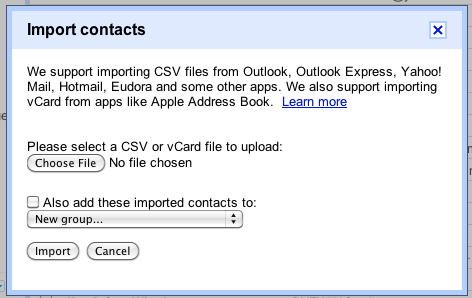
However, I found a way to export just selected Groups that I use regularly: Friends, Clients, Stores, and Family. I named them CellFriends, CellStores, etc. In AddressBook, all you need to do is click on a Group to select it and then choose from the File Menu>Export>Export Group as vCard. Then scroll to the bottom of your Gmail Contacts menu and select Import Contacts… Select the Group you just exported and Google does the rest.
What is really nice about this method is that your contacts are lean and mean. Now when you sync your Android to your Gmail Contacts, you have a manageable contact list.

Import Contacts into Gmail

Import Contacts into Gmail

The SyncMate Way… without Google

Why stumbling around searching for answers to my quest, I ran into this free app called SyncMate. This app installs on your Mac and a client app installs on your Android. It comes in two flavors: Free and Expert.  If you just want to sync contacts and calendars, the free version will suit you. But if you want to sync Safari Bookmarks, iTunes and other things, the Expert version will do it for you. Although I tried to follow Google’s instructions for importing my MobileMe iCalenders, all of them failed to import into my Gmail account. I think since Apple moved to iCal to mobile, there is something that doesn’t work right. However, the SyncMate was able to sync my iCal with no problems, and it is a direct connection between the computer and the smartphone.

I had to use my USB connector to get my Android to work with SyncMate and my Mac for two reasons. My desktop has no Airport WiFi and I couldn’t get my Bluetooth to recognize my phone with SyncMate. I have Bluetooth set up directly between the phone and my computer, but something didn’t quite work with the app. Not sure why. Anyway, just wanted to let you all know that there is life outside of Apple and the Android plays well and gets along nicely with a Mac environment.

Leave a comment

Japan and the Dark Future of Nuclear Power

Give me Global Warming ANY DAY over Cesium-137, Iodine-131, and Strontium-90. Cesium-137 has a half-life of about 30.17 years And don’t get me started on Plutonium contamination. Plutonium-239, with a half-life of 24,100 years. The most common isotope formed in a typical nuclear reactor is the fissile Pu-239 isotope.
I’ve always been against nuclear power. Always thought: too dangerous. To vulnerable to terrorism. To costly if something goes wrong. No place to store the spent fuel. Power for a day maybe, but radiation for generations to come. Japan is just proving to the world that this is NUTS.

4 Comments

Return To Entourage – The Perils of Outlook 2011 on the Mac

Microsoft Entourage Icon

Microsoft Entourage

The Eclectic Rant.

Outlook has Crashed with Error 255 – Warning to all: Stay AWAY From Outlook

If you followed my previous attempts to flee Entourage for a faster, safer and more current email program, you may remember that I have tried and liked Postbox 2, but was not sold on it because of the complex manner it stores emails online and on the local computer, as well as for it’s potential for hangs.  I reluctantly reverted to Entourage, with all its flaws and occasional crashes.  Then in December, I bought the new Microsoft Office 2011 for Mac with Outlook and finally thought I found a program I could live with.  But my experiences over the past couple of days has taught me otherwise… to my great regret and disappointment. Following others who have had the same problem, I realize my experience is not unique.  Not only is data lost and unrecoverable (unlike Entourage where you could rebuild your databases almost all the time) with Outlook, but you cannot even backup from TimeMachine or another backup to restore you files, folders, contacts and settings.

Follow this thread on MS OFFICE

THIS IS THE WORST DATABASE ERROR OF ALL TIME. THIS IS FAR WORSE THAN ENTOURAGE. Having to rebuild my identity from scratch with all my rules and folders etc. is CRAZY. IT will take me days to fix a program that should be a servant not my master. I won’t recommend office 2011 to anyone. It is insane that the rebuild database does not fix this problem. I thought we were supposed to be protected by the new file format, but I can’t even find a way to import those messages. That is probably possible, but losing all my rules, accounts, etc. THAT IS UNACCEPTABLE.

Outlook doesn’t launch anymore, it always quits with the following error msg:
23.11.10 17:11:31 com.apple.launchd.peruser.504[163] ([0x0-0x14f14f].com.microsoft.Outlook[8147]) Exited with exit code: 255

Return to Entourage

I’ve switched back to Entourage for now. This is just not worth it. I cannot believe how dangerous this program is. This isn’t just a minor glitch. This is a full-stop, data losing, business-money costing, dangerous program that could cost you years of data and client correspondence. So much for the idea that separate email files are safer. When I look even for the attachments that are supposed to be saved, they are gone too.

I’ve tried several steps to recover, including replacing the user accounts and database folders with backups, but every time I do, Outlook recognizes the change and forces a rebuild of the database which then recreates the 255 error.  The only thing I was able to do was to create a new identity and import my Entourage files which were over a month out of date, causing a loss of all my recent correspondence and files.

Outlook crashed initially either while running a sync on the address book contacts, or on some other update.  Whatever the reason, the corruption is deep and complete.  The only remedy I’ve heard is to have had the foresight, not to back up your files, but to export your complete Outlook identity as a precaution ever day

The loss of time and labor alone make this Outlook program a minefield and something to be avoided at all costs.

Recommendation: STAY AWAY.

Leave a comment

We’ll be moving to http://eclectic-rant.com/

Hi folks, Since I couldn’t get the EclecticRant.wordpress, but I do have the domain name, I’ll be moving to http://eclectic-rant.com/ in the very near future for future posts and updates.

Leave a comment

Twitter Spam (a.ka. Verbal Diarrhea) on Linkedin

Image representing Twitter as depicted in Crun...

Image via CrunchBase

Linkedin is a service for making business connections. In your profile, it is appropriate to update your work status, new projects, trainings and job applications, but by attaching your Twitter account to your Linkedin profile, you can easily spam your contact list with all sorts of irrelevant material.  In other words, I don’t want to hear about what you ate for breakfast, or what you are feeling about clouds today.  If I became one of your twitter followers, then I’d be asking for it. But I linked to you for business, not to endure an inept use of social media, and be spammed by every passing thought that goes through your vacuous head.

Yesterday morning, I went to my Linkedin home page and found 25 tweets about junk I did not care about from a casual contact. This abuse defeats the purpose of having a Linkedin account.   I was initially given instructions from LI Answers saying that there is no way to turn off one user’s tweets, but that was incorrect. There is a way to turn off one person by choosing HIDE next to one of their updates. (See below for an example.) However, I was advised to make an appeal to the specific user to modify their tweet settings, which I did, since using Linkedin as a tweet receptacle is an abuse of the service. But teaching every user/abuser how to stop spamming could be time-consuming, so I am posting some instructions here:

Go to your Settings under your name in the top right corner of your home page. You will come to this page:

Finding Twitter Settings on LinkedinScroll down to your Twitter Settings and click on it and you will be presented with the following options:

Setting Tweets to #in OnlyChoose: Share only tweets that contain #in. If you choose the second setting, you have to intentionally post a tweet to your Linkedin account, and the rest of your tweets will only go to your followers. If you use this setting, you will save the rest of us a world of headaches. Be courteous. Be QUIET!

Here is how to hide specific users’ updates from your wall:

Hide Tweets from a specific user on Linkedin

Click to Hide Tweets from a specific user on Linkedin